Themes and icons
Built-in themes
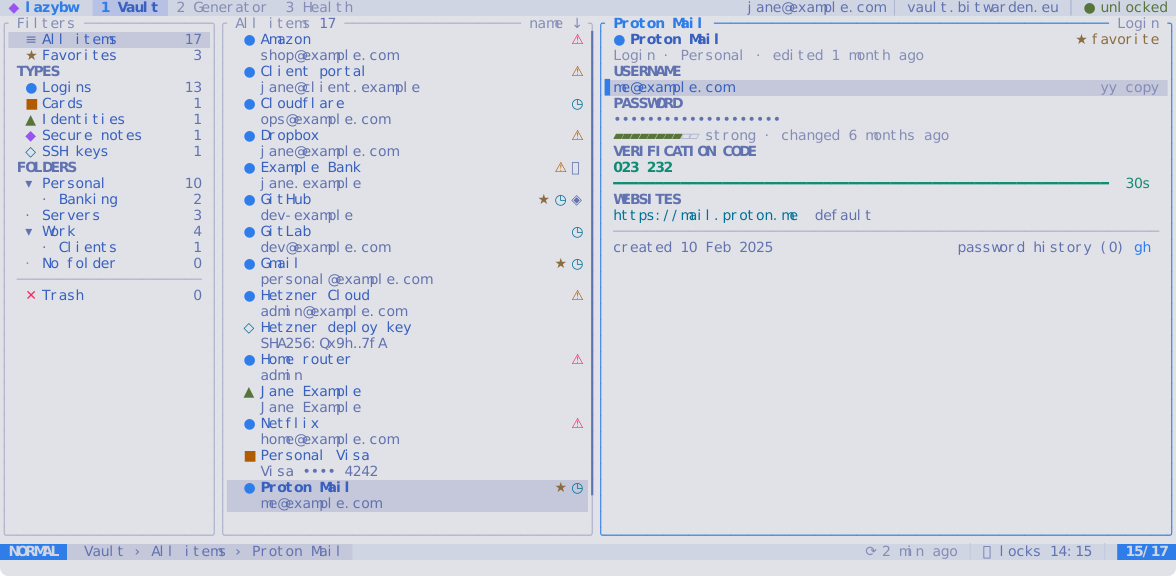
| Theme | Style |
|---|---|
tokyonight-night (default) | dark |
tokyonight-storm | dark |
tokyonight-moon | dark |
tokyonight-day | light |
catppuccin-mocha | dark |
gruvbox-dark | dark |
nord | dark |
rose-pine | dark |
kanagawa-wave | dark |
terminal | uses your terminal’s own colours |
Space t opens a picker with the built-in themes and your own. The screen
changes to each theme as you move through the list; Enter keeps it and
Esc goes back to the one you had. :theme followed by Tab previews the
same way. :theme nord switches directly, and ui.theme in the
configuration sets the theme lazybw starts with.
lazybw themes lists them, and lazybw themes --preview nord prints a
theme’s colours.
With ui.transparent = true, lazybw leaves the background to the terminal,
which suits terminals with a background image or blur. Popups keep a solid
background so they stay readable.
Your own theme
Put a file in ~/.config/lazybw/themes/, for example my-night.toml:
name = "my-night"
extends = "tokyonight-night"   # start from an existing theme
appearance = "dark"            # dark or light

[palette]
accent = "#bb9af7"

[tokens]
"border.focus" = "magenta"
"match" = "#ff9e64"
Then set ui.theme = "my-night". lazybw reloads the theme when you save the
file, so you can tweak it with lazybw open.
A theme has two layers:
- The
paletteholds named colours:bg,bg_dark,bg_highlight,bg_visual,border,fg,fg_dark,comment,dark5,accent,blue,cyan,magenta,purple,orange,yellow,green,teal,redandshadow. - The
tokenssay which colour each part of the interface uses. A token can point to a palette name, a#rrggbbcolour, an ANSI colour number, orresetfor the terminal’s default.
Useful tokens:
| Token | Colours |
|---|---|
bg, bg.bar, bg.float | main background, top and bottom bars, popups |
selection, bg.highlight | the selected row, highlighted rows and segments |
border, border.focus | pane borders, the focused one |
fg, fg.alt, fg.muted, fg.subtle | text from strongest to faintest |
accent | titles, focus and the selection bar |
ok, info, caution, warn, error | messages and states |
type.login, type.card, type.identity, type.note, type.ssh | item icons |
match, link, fav, dirty | search matches, websites, favourites, [+] |
mode.normal, mode.insert, mode.visual, mode.command | the mode label |
The built-in themes are in crates/lazybw/assets/themes/ in the repository
and make good starting points.
On terminals without 24-bit colour, lazybw converts every colour to the
closest of the 256 standard ones. If colours look wrong, check that
COLORTERM is set to truecolor in a terminal that supports it.
Icons
ui.icons chooses the symbols:
nerdfont(default) uses icons from a Nerd Font. Install one and select it in your terminal.unicodeuses ordinary symbols such as●,★and▸, which most fonts have.asciiuses only plain characters, for the most limited terminals.