Configuration
lazybw reads ~/.config/lazybw/config.toml. The file is optional: without
it, lazybw uses the defaults listed in
Default configuration. Put in it only the options you
want to change.
[ui]
theme = "catppuccin-mocha"
icons = "unicode"

[security]
clipboard_timeout = "20s"
auto_lock = "10m"

[vault]
sort = "modified"
Durations are written as "500ms", "30s", "15m", "2h" or "365d".
Options that can be switched off also accept "never".
Changing settings from inside lazybw
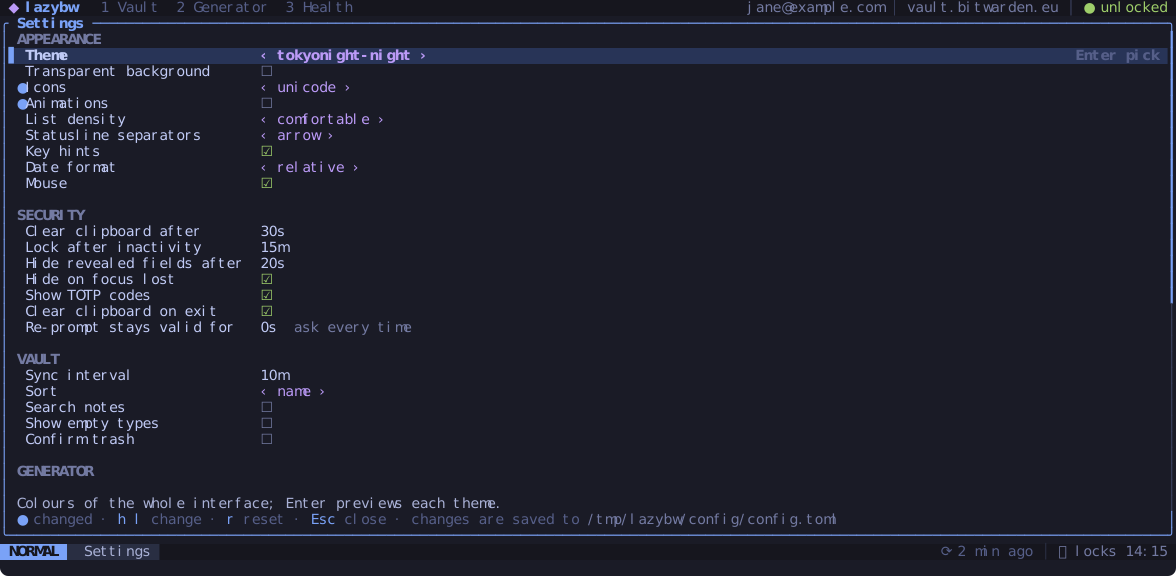
Space , opens the settings screen. Move with j and k, change a value
with h and l (or Enter), and reset it to the default with r. The line
at the bottom explains the selected option, and a ● marks the ones you have
changed from the default. Changes
take effect at once and are written back to config.toml, keeping your
comments and the order of the file.
The same works from the command line:
:set theme=nord            set a value
:set animations!           toggle a true/false option
:set clipboard_timeout?    show the current value
:set animations&           back to the default
Short names work when they are unambiguous. The full name, such as
ui.animations, always works.
Checking the file
lazybw config --check          # validate config.toml
lazybw config --path           # print where it is
lazybw config --print-default  # print the full default file
lazybw also checks the file on start. A mistake, such as a wrong value or a typo in a key binding, opens an error screen that names the file, the line and what is wrong. Unknown keys only produce a warning.
The options most people change
| Option | Default | What it does |
|---|---|---|
ui.theme | "tokyonight-night" | colour theme (see Themes and icons) |
ui.icons | "nerdfont" | nerdfont, unicode or ascii |
ui.animations | true | small fades and slides when panes and popups open |
ui.list_density | "comfortable" | two lines per item, or compact for one |
ui.mouse | true | mouse support |
security.clipboard_timeout | "30s" | when copied values are cleared |
security.auto_lock | "15m" | lock after this long without a key press |
security.reveal_timeout | "20s" | when revealed values hide again |
security.reprompt_grace | "0s" | how long a correct master password re-prompt counts |
vault.sync_interval | "10m" | background sync |
vault.sort | "name" | name, modified, created or type |
vault.search_notes | false | let search look inside notes |
vault.confirm_trash | false | ask before dd moves an item to the trash |
editor.command | "" | editor for Ctrl-e; empty means $VISUAL, then $EDITOR, then vi |
keys.leader | "<Space>" | the leader key |
keys.timeoutlen | "1000ms" | how long lazybw waits to see if a sequence continues |
Using a different bw
lazybw looks for bw in bw.path first, then in the LAZYBW_BW environment
variable, then on your PATH. Set bw.path if you keep several versions.
By default lazybw ignores a BW_SESSION variable in the environment and asks
you to unlock. Set bw.inherit_session = true to reuse an existing session
instead.