Finding items
Filters
Pick a filter in the left pane with Enter: all items, favourites, one item
type, a folder, items without a folder, or the trash. The list title shows
which filter is active and how many items it holds, for example
Finanças › Bancos 7.
Space s changes the sort order. It is followed by n (name), m
(modified), c (created) or t (type), and Space s r reverses the
order.
Search
/ searches inside the current filter. The list narrows as you type, Enter
keeps the result and returns to the list, and n and N jump to the next and
previous match. Esc clears the search.
The search is fuzzy, so gthb finds GitHub. It looks at the item name first,
then the username, the website hosts and the names of custom fields. Set
vault.search_notes = true to search inside notes as well.
You can narrow the search with qualifiers:
| Qualifier | Matches |
|---|---|
type:login (or l, note, card, identity, ssh) | one item type |
folder:work/proj | folders whose path starts with this; folder:none for items without one |
is:fav, is:trash, is:reprompt | favourites, trashed items, items that ask for the master password |
is:weak, is:reused, is:exposed, is:old, is:insecure | results of the last health check |
has:totp, has:passkey, has:fields, has:notes, has:uri | items with that kind of data |
uri:google, user:alice, name:bank | text inside one field |
Put - in front of a word or qualifier to exclude it, and quotes around a
phrase with spaces. A few examples:
git -type:note
has:totp folder:work
is:reused uri:google
"home router"
Quick open
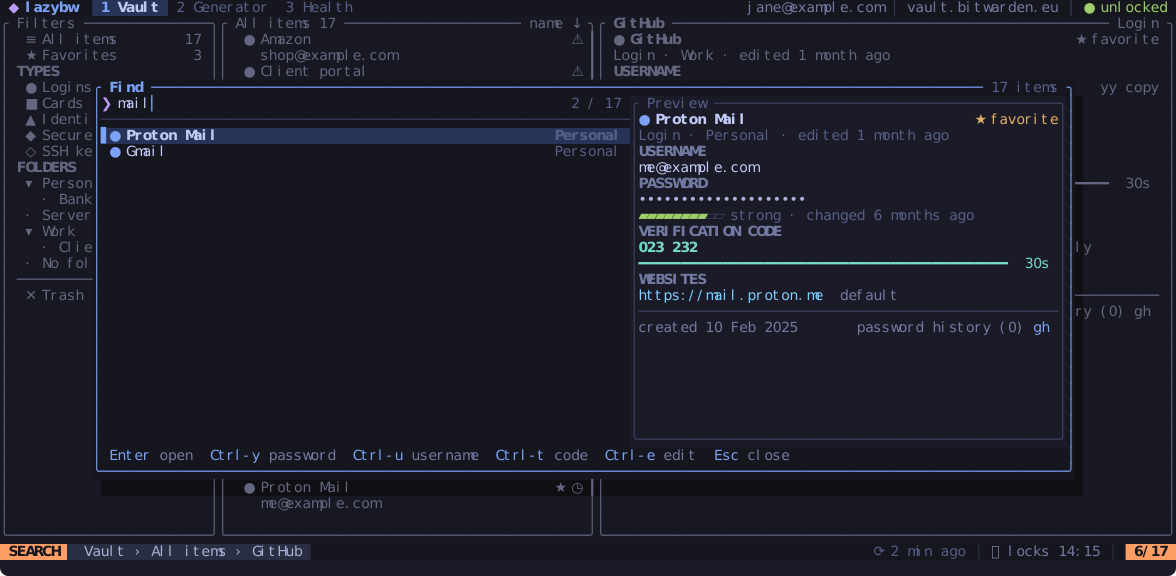
Ctrl-p (or Space /) opens a finder over the whole vault, wherever you
are. Type a few letters and act on the match without leaving the finder:
| Keys | Does |
|---|---|
Enter | open the item |
Ctrl-y | copy the password |
Ctrl-u | copy the username |
Ctrl-t | copy the verification code |
Ctrl-e | edit the item |
Ctrl-n / Ctrl-p | next / previous match |
Quick open uses the same search language as /. It leaves trashed items out
unless you add is:trash.
Jumping back
lazybw remembers where you have been. Ctrl-o goes back to the previous item
or filter and Ctrl-i goes forward again. gf jumps to the folder of the
item under the cursor.