Moving around
lazybw uses Vim’s keys. If you know Vim, most of this page will be familiar.
Basic movement
| Keys | Moves |
|---|---|
j / k (or the arrow keys) | down / up one row |
gg / G | to the first / last row |
Ctrl-d / Ctrl-u | half a page down / up |
Ctrl-f / Ctrl-b | a page down / up |
H / M / L | to the top / middle / bottom of the visible rows |
zz / zt / zb | scroll so the cursor sits in the middle / top / bottom |
h / l | focus the pane to the left / right |
Tab / Shift-Tab | focus the next / previous pane |
A number before a motion repeats it: 5j moves five rows down and 12G goes
to the twelfth item. A few actions take a count too, so 3dd moves three
items to the trash.
The leader key
Many commands start with the leader key, which is Space unless you change
it. Space g opens the generator, Space l locks the vault, and so on.
In this book the leader is written as Space.
Which-key
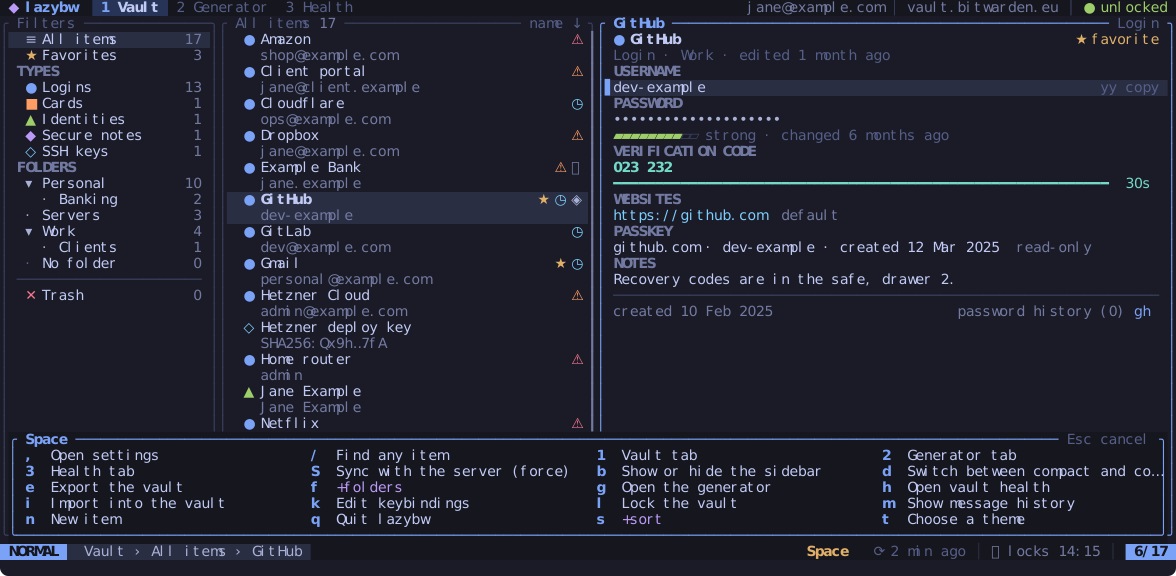
Press Space and wait a moment. A panel opens above the status line with
every key that can follow, each with a short description. Groups that lead
to more keys are marked with a +, such as +folders behind Space f.
The panel stays open until you press a key, and Esc cancels.
The same panel appears for the other prefixes: g, z, y and d.
If you type a sequence that does not exist, such as z followed by a key
that has no meaning after z, lazybw drops the whole sequence and does
nothing. It never runs the second key on its own.
Help
? opens the help for the screen you are on, grouped by context. Press /
to search it, and q or Esc to close it.
Mouse
Clicking selects panes, rows and tabs, the wheel scrolls, and dragging a
pane border resizes it. Set ui.mouse = false if you would rather the
terminal kept the mouse for selecting text.
Redrawing the screen
If something ever leaves garbage on the screen, Ctrl-l repaints all of it.