
lazybw is a terminal interface for your Bitwarden vault. You browse, search, copy and edit items with the keyboard, the way you would move around in Vim or lazygit, and you never leave the terminal.
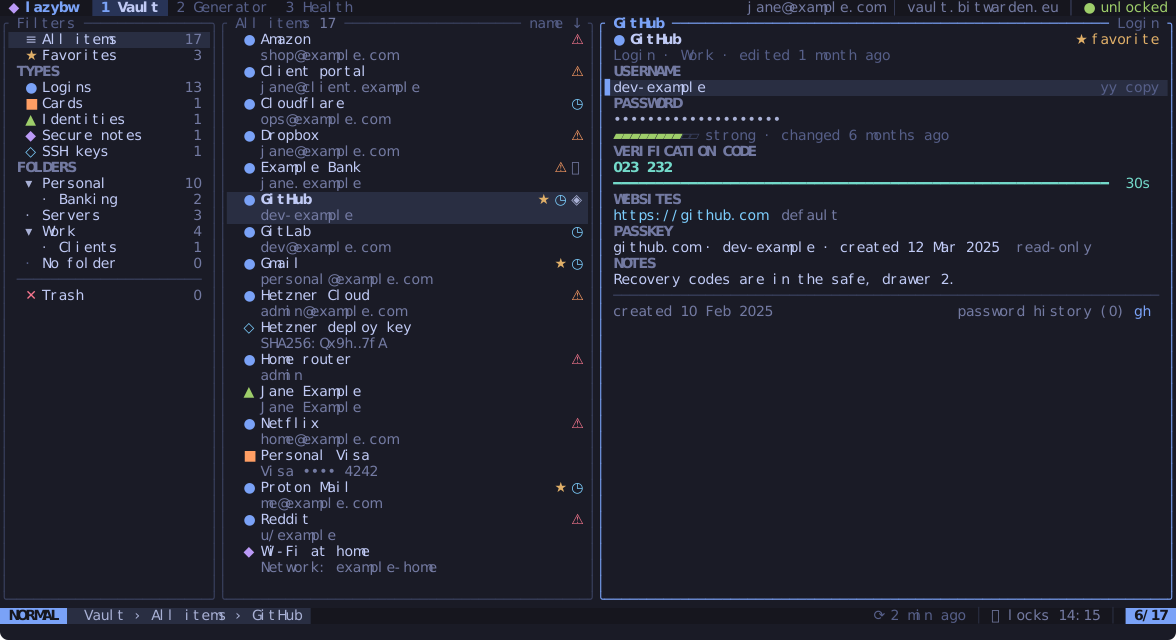
It runs on top of the official Bitwarden command-line client, bw. lazybw
starts bw serve in the background and talks to it over a private channel,
so all encryption and decryption happen in Bitwarden’s own code. lazybw only
draws the screen and sends requests.
What you can do with it
- Log in (email and password with two-step login, single sign-on or an API key), unlock, lock and sync.
- Browse logins, secure notes, cards, identities and SSH keys by type or by folder, and find any item with fuzzy search.
- Copy usernames, passwords and verification codes. The clipboard clears itself after 30 seconds.
- Create and edit items in a form, or open the notes (or the whole item as
JSON) in your
$EDITOR. - Generate passwords and passphrases, check the vault for weak, reused or exposed passwords, and import or export the vault.
- Change every keybinding, pick one of ten themes or write your own.
Who it is for
lazybw is for people who already live in a terminal and use Bitwarden. If you
like Vim motions, you will feel at home within minutes. If you don’t, the
arrow keys work too, and ? shows the keys for the screen you are on.
It runs on Linux, locally or over SSH, under X11 or Wayland.
How this book is organised
Getting started covers installation and the first login. Using lazybw goes through the daily tasks one by one. Making it yours explains the configuration file, the keybindings and the themes. The last chapters describe how lazybw protects your data and list every key, option and command.